
How do you request a federal official’s browser history, SharePoint files or Teams messages under FOIA?
Find the agency’s real Microsoft 365 systems with public DNS and Microsoft’s sign-in metadata, name a custodian by name and title, and ask for each record type by the system that holds it. Results vary. The Secret Service processed requests for five senior officials’ browser histories and released records in part, but a federal appeals court has held that browsing histories an agency neither keeps nor uses are not agency records.
You can ask a federal agency for an official’s web activity, the files the official made and the chats the official sent. Requests for those records can come back empty when they don’t name the system, the person or the place the data lives. This guide fixes that in seven steps, with copy-paste language for each record.
The method is a loop. Public internet records tell you where an agency keeps its files. A records request names those systems and a custodian. Each release then hands you new names, offices and systems for the next request.
The worked example throughout is two rounds of requests to the U.S. Secret Service, in 2023 and 2025. Here is what one page of the first round looks like.
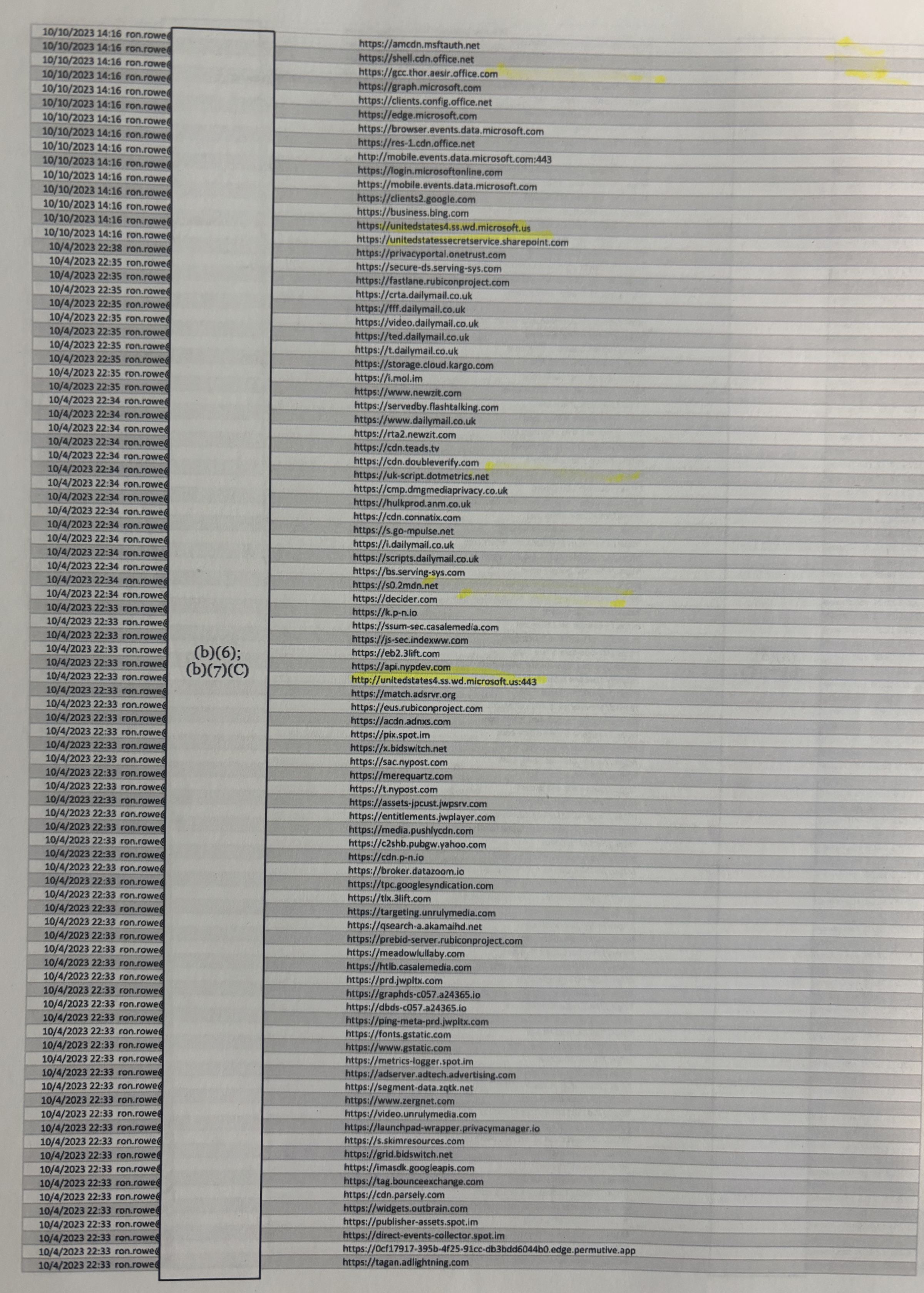
What the page shows
- Dates. 15 rows at
10/10/2023 14:16; the rest between10/4/2023 22:33and22:38, newest first. - User. A username column that begins
ron.rowe. The next column is withheld under (b)(6) and (b)(7)(C). - Agency systems.
unitedstatessecretservice.sharepoint.com,gcc.thor.aesir.office.com,graph.microsoft.com,login.microsoftonline.com. - Everything else. Daily Mail, New York Post and Decider hosts, plus ad-exchange and ad-verification hosts such as
fastlane.rubiconproject.com,match.adsrvr.organdcdn.doubleverify.com. - Format. Host names only, no page paths or titles.
Editor’s note: The author filed these requests in a personal capacity: five requests received by the Secret Service on Nov. 3, 2023 (log numbers 20240109 through 20240113), and a request received on April 21, 2025. OctoProbe News reviewed the releases and posts them with two redactions, described under Primary documents.
How does the OSINT–FOIA loop work?
Records requests fail for boring reasons. Yours names the wrong office. It asks for “all communications” and gets a steep fee estimate. It asks for “SharePoint files” and gets “no records,” because nobody searched SharePoint.
Open-source intelligence, the research discipline built on public information, fixes much of that. It can tell you the name of an agency’s Microsoft 365 tenant, which cloud it runs in, which offices have their own sites and who holds which job. A request that carries those facts is harder to misread and harder to dodge.
The loop runs the other way, too. Every release is a lead sheet for the next request.
- 1 Map. Find the agency’s Microsoft 365 tenant with public DNS and Microsoft’s sign-in metadata. Example:
unitedstatessecretservice-my.sharepoint.com - 2 Name. Identify the custodian by name and title from bios, press releases and FOIA logs. Example:
Deputy Director Ronald L. Rowe Jr. - 3 Request. Ask for the custodian’s web logs, SharePoint and OneDrive documents, and Teams messages. Example:
“The last 100 documents edited by the custodian” - 4 Mine. Read the release for new site names, hosts, offices and custodians, then map again. Example:
“SP 2016 Audit Logs,” p. 116
Step 1: Identify the agency’s Microsoft 365 tenant and SharePoint hosts
Many federal agencies run on Microsoft 365. Every Microsoft 365 customer has a tenant, and the tenant’s original name becomes its SharePoint address. Microsoft spells this out: “When you first sign up for Microsoft 365, you create an onmicrosoft.com domain. Even if you later add a custom domain, all your SharePoint and OneDrive URLs use the original onmicrosoft.com domain.”
So don’t guess the address from the agency’s email domain. Confirm it with three public checks. None of them touches the agency’s servers.
- Check DNS. Look up the candidate name, such as
[tenant].sharepoint.com, through a public DNS-over-HTTPS service. A name that resolves exists. NXDOMAIN means no such name. Run a made-up control name too. If it fails and yours resolves, your result means something. - Read Microsoft’s public sign-in metadata. Microsoft publishes an OpenID Connect discovery document for every tenant so that apps can sign users in. Ask for it by the agency’s email domain, and it returns the tenant’s ID. Ask again with
[tenant].onmicrosoft.com. If the IDs match, the SharePoint name belongs to the agency. A region field reading “GCC” marks Microsoft’s government community cloud. - Search passive DNS and certificate logs. Services such as SecurityTrails, owned by Recorded Future since January 2022, keep histories of DNS names. Certificate-transparency logs, searchable at crt.sh, list the certificates issued for an agency’s own domains. Both are better at finding an agency’s websites than its SharePoint, which sits behind Microsoft’s certificates.
Know what each result proves. A name that resolves shows that a Microsoft customer by that name exists. It does not show who the customer is. Anyone can register a tenant with a government-sounding name. The tenant-ID match is what ties a SharePoint name to an agency’s own email domains. A name that fails to resolve is a dead end for now, but it may be a typo, a renamed tenant or a retired host. Check again before you write it into a request.
Start with the host-finder table. A spreadsheet compiled by Redwing Technologies lists 431 FOIA components, nearly all federal, with their known SharePoint hosts. OctoProbe checked every host in it by DNS on Oct. 20, 2026. Of 334 unique names, 282 resolved and 52 did not. Treat it as a starting list, not an answer. Search your agency, then run the three checks yourself.
431 rows
334 unique hosts
282 resolve
52 no DNS record
Showing the 35 Homeland Security rows and rows with notes. The full table of 431 rows is in the CSV.
| Row | Component | Hostnames in the sheet, with DNS check | Notes |
|---|---|---|---|
| 73 | Department of EducationDepartment of Education | Base ed.sharepoint.com no DNS record | No listed host resolves. |
| 74 | Office of Inspector GeneralDepartment of Education | Base ed.sharepoint.com no DNS record | No listed host resolves. |
| 106 | U.S. Customs & Border ProtectionDepartment of Homeland Security | Base usdhs.sharepoint.com resolvesPersonal (-my) usdhs-my.sharepoint.com resolvesSub-agency cbpgov.sharepoint.com resolvescbpgov-my.sharepoint.com resolves | |
| 107 | United States Secret ServiceDepartment of Homeland Security | Base usdhs.sharepoint.com resolvesPersonal (-my) usdhs-my.sharepoint.com resolvesSub-agency usss.sharepoint.com no DNS record | Sheet lists |
| 108 | Cybersecurity and Information Security AgencyDepartment of Homeland Security | Base usdhs.sharepoint.com resolvesPersonal (-my) usdhs-my.sharepoint.com resolvesSub-agency cisa.sharepoint.com no DNS recordcisa-my.sharepoint.com no DNS record | Agency name is wrong in the sheet: it is the Cybersecurity and Infrastructure Security Agency. The listed |
| 109 | DHS Privacy OfficeDepartment of Homeland Security | Base usdhs.sharepoint.com resolvesPersonal (-my) usdhs-my.sharepoint.com resolves | |
| 110 | Federal Emergency Management AgencyDepartment of Homeland Security | Base usdhs.sharepoint.com resolvesPersonal (-my) usdhs-my.sharepoint.com resolvesSub-agency usfema.sharepoint.com resolvesusfema-my.sharepoint.com resolvesAdmin usfema-admin.sharepoint.com resolves | |
| 111 | Federal Law Enforcement Training CenterDepartment of Homeland Security | Base usdhs.sharepoint.com resolvesPersonal (-my) usdhs-my.sharepoint.com resolves | |
| 112 | Federal Protective ServiceDepartment of Homeland Security | Base usdhs.sharepoint.com resolvesPersonal (-my) usdhs-my.sharepoint.com resolves | |
| 113 | Office of Biometric Identity ManagementDepartment of Homeland Security | Base usdhs.sharepoint.com resolvesPersonal (-my) usdhs-my.sharepoint.com resolves | |
| 114 | Office of the Inspector GeneralDepartment of Homeland Security | Base usdhs.sharepoint.com resolvesPersonal (-my) usdhs-my.sharepoint.com resolves | |
| 115 | Select Department of Homeland Security component for meDepartment of Homeland Security | Base usdhs.sharepoint.com resolvesPersonal (-my) usdhs-my.sharepoint.com resolves | Not a component: this row is a FOIA.gov menu option captured with the list. |
| 116 | Transportation Security AdministrationDepartment of Homeland Security | Base usdhs.sharepoint.com resolvesPersonal (-my) usdhs-my.sharepoint.com resolves | |
| 117 | U.S. Citizenship & Immigration ServicesDepartment of Homeland Security | Base usdhs.sharepoint.com resolvesPersonal (-my) usdhs-my.sharepoint.com resolves | |
| 118 | U.S. Coast GuardDepartment of Homeland Security | Base usdhs.sharepoint.com resolvesPersonal (-my) usdhs-my.sharepoint.com resolvesSub-agency uscg.sharepoint-mil.us resolvesuscg-my.sharepoint-mil.us resolvesuscg-web.sharepoint-mil.us resolves | |
| 119 | U.S. Immigration & Customs EnforcementDepartment of Homeland Security | Base usdhs.sharepoint.com resolvesPersonal (-my) usdhs-my.sharepoint.com resolvesSub-agency icegov.sharepoint.com resolvesicegov-my.sharepoint.com resolvesicegov-656b92bc306ea9.sharepoint.com resolvesicegov-5d604886c627e9.sharepoint.com resolvesAdmin icegov-admin.sharepoint.com resolves | |
| 200 | Bureau of ReclamationDepartment of the Interior | Base https://doimspp.sharepoint.com/ resolvesPersonal (-my) doimspp-my.sharepoint.com resolvesSub-agency https://doimspp.sharepoint.com/sites/bor-policyandprograms/SitePages/Reclamation-Manual-Coordinators.aspx resolvesOffice https://doamspp.sharepoint.com/sites/bor-83-CRD" no DNS record | The Office host |
| 280 | HeadquartersGeneral Services Administration | Base gsa.sharepoint.com no DNS record | No listed host resolves. |
| 281 | Office of Inspector GeneralGeneral Services Administration | Base gsa.sharepoint.com no DNS record | No listed host resolves. |
| 282 | Office of Inspector GeneralLegal Services Corporation | Base lsc.sharepoint.com no DNS record | No listed host resolves. |
| 283 | Office of Legal AffairsLegal Services Corporation | Base lsc.sharepoint.com no DNS record | No listed host resolves. |
| 334 | Office of the Inspector GeneralUnited States Postal Service | Base usps365.sharepoint.com resolvesCell link points to usps365-my.sharepoint.comPersonal (-my) usps365-my.sharepoint.com resolvesSub-agency uspsoiglab.sharepoint.com resolvesuspsoiglab-my.sharepoint.com resolves | The cell’s hyperlink and its displayed text name different hosts. |
| 335 | Postal Inspection ServiceUnited States Postal Service | Base usps365.sharepoint.com resolvesCell link points to usps365-my.sharepoint.comPersonal (-my) usps365-my.sharepoint.com resolves | The cell’s hyperlink and its displayed text name different hosts. |
| 336 | USPS Headquarters OfficeUnited States Postal Service | Base usps365.sharepoint.com resolvesCell link points to usps365-my.sharepoint.comPersonal (-my) usps365-my.sharepoint.com resolves | The cell’s hyperlink and its displayed text name different hosts. |
| 338 | District of ColumbiaIndependent / untagged | Base dcgovict.sharepoint.com resolvesCell link points to dcgovict-my.sharepoint.comPersonal (-my) dcgovict-my.sharepoint.com resolvesAdmin dcgovict-admin.sharepoint.com resolves | D.C. government. It answers requests under the D.C. FOIA, not the federal FOIA. The cell’s hyperlink and its displayed text name different hosts. |
| 343 | U.S. Chamber of CommerceIndependent / untagged | Base uscc.sharepoint.com resolvesCell link points to uscc-my.sharepoint.comPersonal (-my) uscc-my.sharepoint.com resolves | The U.S. Chamber of Commerce is a private business group, not a federal agency. FOIA does not apply to it. The cell’s hyperlink and its displayed text name different hosts. |
| 359 | Court Services and Offender Supervision AgencyIndependent / untagged | Base csosa.sharepoint.com no DNS record | No listed host resolves. |
| 362 | Environmental Protection AgencyIndependent / untagged | Base usepa.sharepoint.com resolvesPersonal (-my) usepa-my.sharepoint.com resolvesusepa-7291dac51b289a.sharepoint.com resolvesusepa-web.sharepoint.com no DNS recordCell link points to usepa.sharepoint.comAdmin usepa-admin.sharepoint.com resolves | The cell’s hyperlink and its displayed text name different hosts. |
| 372 | Federal Mediation and Conciliation ServiceIndependent / untagged | Base fmcsgov.sharepoint.com resolvesCell link points to fmcsgov-my.sharepoint.comPersonal (-my) fmcsgov-my.sharepoint.com resolves | The cell’s hyperlink and its displayed text name different hosts. |
| 381 | Institute of Museum and Library ServicesIndependent / untagged | Base imls365.sharepoint.com resolvesPersonal (-my) imls365-my.sharepoint.com resolvesCell link points to imls365.sharepoint.com | The cell’s hyperlink and its displayed text name different hosts. |
| 393 | National Mediation BoardIndependent / untagged | Base NMB.sharepoint.com no DNS recordPersonal (-my) NMB-my.sharepoint.com no DNS record | No listed host resolves. |
| 398 | Office of Government EthicsIndependent / untagged | Base OGE.sharepoint.com resolvesPersonal (-my) OGE-my.sharepoint.com resolvesCell link points to oge.sharepoint.com | The cell’s hyperlink and its displayed text name different hosts. |
| 401 | Office of Navajo and Hopi Indian RelocationIndependent / untagged | Base onhir.sharepoint.com no DNS recordPersonal (-my) onhir-my.sharepoint.com no DNS record | No listed host resolves. |
| 405 | Office of Special CounselIndependent / untagged | Base osc.sharepoint.com resolvesPersonal (-my) osc-my.sharepoint.com resolvesosc-public.sharepoint.com no DNS recordCell link points to osc.sharepoint.com | The cell’s hyperlink and its displayed text name different hosts. |
| 409 | Office of the Special Inspector General for Afghanistan ReconstructionIndependent / untagged | Base sigar.sharepoint.com no DNS recordPersonal (-my) sigar-my.sharepoint.com no DNS recordAdmin sigar-admin.sharepoint.com no DNS record | No listed host resolves. |
Compiled by Redwing Technologies. Download the data unaltered: XLSX · CSV · DNS results: CSV
Editor’s note: OctoProbe hosts the spreadsheet unaltered and flags known errors in the table above rather than changing the file. The Secret Service row’s usss.sharepoint.com does not resolve; the live tenant is unitedstatessecretservice.sharepoint.com. The Cybersecurity and Infrastructure Security Agency is misnamed as the “Cybersecurity and Information Security Agency.” The Bureau of Reclamation row’s doamspp should read doimspp. The U.S. Chamber of Commerce and District of Columbia rows are not covered by the federal FOIA. In 10 cells, the hyperlink and the displayed text name different hosts: C334–C336, C338, C343, C372, D362, D381, D398 and D405.
Editor’s note: Every check in this guide is passive. The Computer Fraud and Abuse Act makes it a crime to anyone who “intentionally accesses a computer without authorization or exceeds authorized access” and obtains information. Looking up a public name is not access. Signing in is.
Step 2: Identify the custodian by name or title
You don’t need an email address. Agencies search by custodian, the person whose records are at issue, and a name with a title is enough. If you don’t know the name, a title can work; Cause of Action Institute named two of its officials by position. A name and title together leave the least room for error.
Start with the agency’s own words. Leadership pages, testimony, org charts and press releases give titles and dates. Those dates matter, because your request should cover a period when the person held the job.
FOIA logs are a second source. Many agencies post them, and they show which custodians other requesters have named and what came back.
If a release shows a username, note it. Don’t build on it. An address pattern guessed from one partial username is a guess, and your request doesn’t need it.
Step 3: Choose the record types
Once you know the tenant and the person, these records come into reach. Ask for each one by the system that holds it.
Browser history and web-proxy logs
Ask for both the history and the logs. Request the browser history itself, and request any web-proxy, secure-gateway, DNS or endpoint logs that record what the custodian’s accounts and devices visited. Cause of Action turned partly on employees’ freedom to delete their own histories. A log kept centrally by the agency’s network or security tools stands on different footing.
Editor’s note: The 10/4/2023 rows on the Rowe page list host names for ad auctions and ad verification, among them fastlane.rubiconproject.com, ssum-sec.casalemedia.com, eb2.3lift.com, match.adsrvr.org, acdn.adnxs.com, x.bidswitch.net and cdn.doubleverify.com. These are the kind of real-time-bidding systems explained in OctoProbe’s report on DHS and phone location data. The log shows only that a browser on the account contacted them. It does not show what was read, what was shown or what data left the session.
SharePoint documents created and edited
Ask for documents by who made or changed them. Microsoft’s eDiscovery tools, which agencies use to search their own systems, track a document’s “Created by” value and “Last modified by,” described as “The user who last modified the document.” The audit log records “Modified file” and “Uploaded file” events, among others, according to Microsoft’s activity list.
Name both hosts: the main SharePoint and the custodian’s OneDrive at [tenant]-my.sharepoint.com. Ask for the documents themselves, sorted by last-modified date, over a fixed period. Step 5 explains why.
For documents a custodian commented on, ask for the documents. OctoProbe found no comment event for SharePoint files in Microsoft’s audit activity list, so a request for a comment log may come back empty even when the documents exist.
Teams messages, channel files and chat files
Teams chats are easy to miss in a records search. Microsoft’s eDiscovery guide says “Teams data is stored in Azure Cosmos DB. Exchange Online stores Teams compliance records” that eDiscovery searches. In practice, chat messages are copied into mailboxes, and shared files land in OneDrive or SharePoint. Name each place:
- Chats (1:1 and group): the custodian’s Exchange Online mailbox.
- Channel posts: the team’s mailbox, by team name.
- Channel files: the team’s SharePoint site.
- Files shared in chats: the sharer’s OneDrive.
| Record | What Microsoft says | Name it in the request as | Source |
|---|---|---|---|
| 1:1 chats | “Messages in 1:1 chats are stored in the Exchange Online mailbox of all chat participants.” | The custodian’s Exchange Online mailbox | Microsoft Learn |
| Group chats | “Messages in group chats are stored in the Exchange Online mailbox of all chat participants.” | The custodian’s Exchange Online mailbox | Microsoft Learn |
| Files shared in chats | “Files shared in a 1:1 chat are stored in the OneDrive account of the person who shared the file.” | The custodian’s OneDrive ([tenant]-my.sharepoint.com) | Microsoft Learn |
| Standard channel posts | “All channel messages and posts are stored in the Exchange Online mailbox associated with the team.” | The team’s mailbox, by team name | Microsoft Learn |
| Channel files | “Files shared in a channel are stored in the SharePoint site associated with the team.” | The team’s SharePoint site | Microsoft Learn |
| Who created or edited a document | eDiscovery metadata includes “Created by” (“Created by value from SharePoint”) and “Last modified by” (“The user who last modified the document”). | SharePoint and OneDrive, sorted by last-modified date | Microsoft Learn |
| File activity | The audit log records “Accessed file” (FileAccessed), “Modified file” (FileModified) and “Uploaded file” (FileUploaded) events. | Audit records for the custodian’s account, if retained | Microsoft Learn |
Card statements and sitemaps
Two more records round out a request. An official’s agency card statements show spending. A sitemap of the agency’s SharePoint shows how the agency organizes its work, and its site names tell you which offices and systems to name next.
Step 4: Write the request
Keep each item to one sentence. Give every item a date range, a custodian with a title and a system. Then add the parts that decide cost and speed.
- Scope and date range. One record type per numbered item. A fixed start and end date on each.
- Custodian. Full name and title.
- Systems. SharePoint, OneDrive, Exchange Online and Teams, by host name where you have it.
- Format. FOIA requires agencies to provide records “in any form or format requested by the person if the record is readily reproducible” in that form. Ask for electronic copies or native files.
- Fee category. If you’re a reporter, say so. Fees for “a representative of the news media” are limited to “reasonable standard charges for document duplication” when records are not sought for commercial use. The law defines that requester as one who “gathers information of potential interest to a segment of the public, uses its editorial skills to turn the raw materials into a distinct work, and distributes that work to an audience.”
- Fee waiver. Ask for one if the records are newsworthy. The standard is disclosure that “is likely to contribute significantly to public understanding of the operations or activities of the government and is not primarily in the commercial interest of the requester.” Explain how you will publish.
- Expedited processing, where it applies. A requester “primarily engaged in disseminating information” can ask for it by showing “urgency to inform the public concerning actual or alleged Federal Government activity.” The request must be “certified by such person to be true and correct to the best of such person’s knowledge and belief.” Use it only when the urgency is real.
- A search description. Ask the agency to describe where it looked. A “no records” answer means more when you know.
Sample request language
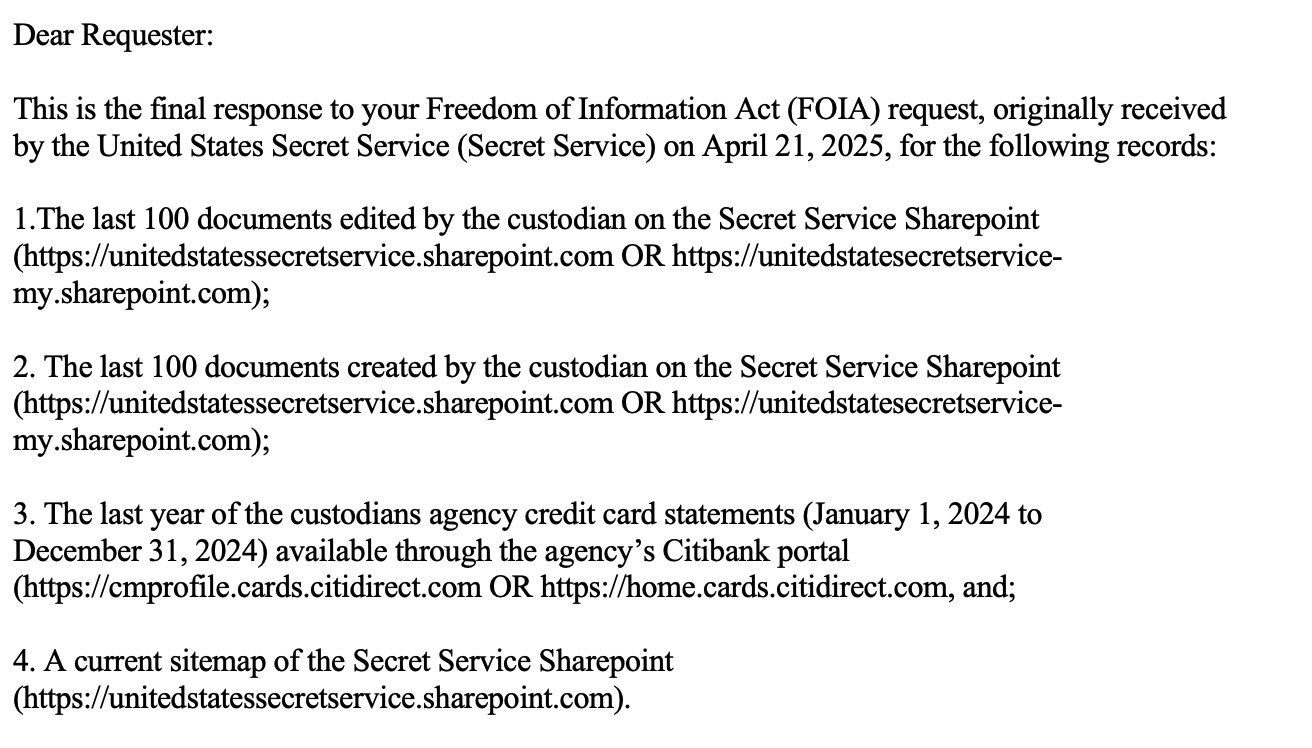
Open with one line, number one item per record and close with format and fees. Replace every bracketed field. For documents and sitemaps, adapt the 2025 wording above. The templates below are OctoProbe’s, built on the statute’s wording.
Under the Freedom of Information Act, 5 U.S.C. § 552, I request the following records:
Browser history and web logs.
The web browsing history of [CUSTODIAN], [TITLE], from [START] to [END], including any centrally retained web proxy, secure web gateway, DNS or endpoint logs that record the URLs or hostnames visited from [CUSTODIAN]’s agency accounts or devices.
Documents commented on.
Documents on the [AGENCY] SharePoint or OneDrive (https://[TENANT].sharepoint.com OR https://[TENANT]-my.sharepoint.com) on which [CUSTODIAN] added or replied to a comment from [START] to [END].
Teams messages.
All Microsoft Teams messages sent or received by [CUSTODIAN], [TITLE], from [START] to [END], including 1:1 chats, group chats and channel posts, containing any of these terms: [KEYWORDS]. This includes the copies of those messages kept in [CUSTODIAN]’s Exchange Online mailbox, and files [CUSTODIAN] shared in those chats as stored in [CUSTODIAN]’s OneDrive (https://[TENANT]-my.sharepoint.com).
Card statements.
[CUSTODIAN]’s agency credit card statements from [START] to [END], including statements available through the agency’s card-program portal.
Format and search.
Please provide the records in electronic form, as native files where available, under 5 U.S.C. § 552(a)(3)(B). Please describe the systems and locations searched.
News-media fee category.
I am a representative of the news media, as defined in 5 U.S.C. § 552(a)(4)(A)(ii), and I seek these records for news gathering, not for commercial use. Please limit any fees to duplication charges.
Fee waiver.
I request a waiver of all fees under 5 U.S.C. § 552(a)(4)(A)(iii). Disclosure is in the public interest because it is likely to contribute significantly to public understanding of the operations or activities of the government, and it is not primarily in my commercial interest. [Explain how and where you will publish.]
Expedited processing.
I request expedited processing under 5 U.S.C. § 552(a)(6)(E). I am primarily engaged in disseminating information, and there is an urgency to inform the public concerning actual or alleged Federal Government activity: [explain the urgency]. I certify that this statement is true and correct to the best of my knowledge and belief.
A few rules of thumb:
- Use keywords for Teams and email. A year of chats with no search terms invites a delay or a fee estimate.
- Split big asks into separate numbered items, so one problem item doesn’t stall the rest.
- Keep the request about records, not people’s private lives. Expect exemptions (b)(6) and (b)(7)(C) on names and personal details.
Step 5: Anticipate the agency’s answers
Three answers come back again and again. Plan for each before you file.
“Exempt”
In the Secret Service releases, three codes cover nearly everything withheld. Exemption (b)(6) protects files whose release would be “a clearly unwarranted invasion of personal privacy.” Exemption (b)(7)(C) protects law-enforcement records whose release “could reasonably be expected to constitute an unwarranted invasion of personal privacy.” Exemption (b)(7)(E) protects material that “would disclose techniques and procedures for law enforcement investigations or prosecutions.”
How to word around them: ask for records about official work, not private details. Expect names of staff and account numbers to come out blacked out. Ask for what a withheld column would show in the aggregate, such as site names without addresses, when the addresses are the sensitive part.
“No duty to create a record”
The legal risk is the word “list.” FOIA requires agencies to “make reasonable efforts to search for the records in electronic form or format,” and to provide records “in any form or format requested … if the record is readily reproducible.” Courts have said a database query is a search. The U.S. Court of Appeals for the Ninth Circuit held in 2021 that “using a query to search for and extract a particular arrangement or subset of data already maintained in an agency’s database does not amount to the creation of a new record.” The court added, “It makes no difference if the query produces a set of documents, a list, a spreadsheet, or some other form of results that the agency has not previously viewed.”
A federal judge in Washington drew a line in 2012. The court held that “sorting a pre-existing database of information to make information intelligible does not involve the creation of a new record.” But a request for a “listing or index of a database’s contents that does not seek the contents of the database, but instead essentially seeks information about those contents, is a request that requires the creation of a new record, insofar as the agency has not previously created and retained such a listing or index.” In a later ruling in the same litigation, the D.C. Circuit sided with the CIA on a request for one such listing.
That is a real risk for both “last 100” requests and sitemap requests. How to word around it: ask for the documents themselves, sorted by date, over a fixed period, not a list of them. For a sitemap, ask for an existing site inventory or admin report if one exists.
“Not an agency record”
Under FOIA, the public can get “agency records.” The law defines a record broadly, as information “maintained by an agency in any format, including an electronic format.” The harder question is whether something on a government computer belongs to the agency at all.
In 2021, the U.S. Court of Appeals for the D.C. Circuit said browsing histories did not, at least in one case. A watchdog group, Cause of Action Institute, had asked the Office of Management and Budget and the Agriculture Department for senior officials’ web histories. The court ruled for the agencies.
The court’s reasons were practical. “OMB and USDA did not use the officials’ browsing histories for any purpose, much less a purpose connected to agency decisionmaking,” the court wrote. And “employees of OMB and USDA could freely delete their browsing histories, a practice incompatible with integration of these documents into the agencies’ record systems.”
Cause of Action turned on control and use: whether the agency kept the data, relied on it and let employees erase it. A centrally kept web log is a different animal. The National Archives’ general records schedule for IT systems treats “log-in files,” “audit trail files and extracts” and “system usage files” as federal records with a set disposition: “Destroy when business use ceases.” The schedule does not mention browser history by name, and it carves out monitoring for agency missions such as law enforcement. But it shows that logs of this kind are records an agency is expected to manage.
How to word around it: ask for the browser history and for any centrally retained proxy, gateway, DNS or endpoint logs in the same item. If the agency calls the history personal, the logs are a separate question.
Step 6: Track and follow up
Write down the date the agency received your request and the log number it assigns. The clock starts there. Agencies must “determine within 20 days (excepting Saturdays, Sundays, and legal public holidays)” whether to comply. The law lets agencies extend that deadline in “unusual circumstances,” and they must tell you in writing when they do.
Check the agency’s FOIA log. Many agencies post them. A log entry confirms what the agency recorded as your request, when it arrived and how it closed. It also shows you how other requesters worded similar asks.

Editor’s note: Requester name redacted by OctoProbe; the requester is the author. The full log is linked as the agency posted it.
Watch the disposal clock. The National Archives’ schedule lets agencies destroy many system logs “when business use ceases,” so a request for last month’s web log has better odds than one for last year’s. File log requests fast.
If you hit a dispute you can’t resolve with the FOIA office, the Office of Government Information Services at the National Archives is one option. The law says OGIS “shall offer mediation services to resolve disputes between persons making requests under this section and administrative agencies as a nonexclusive alternative to litigation.”
Step 7: Use what comes back
Each release is raw material. Read it for names, systems and redaction patterns, and turn them into the next set of requests.
- Sites become systems. A site that holds audit logs or a card-program portal points to records you can name.
- Hosts become clouds. Microsoft host names in a log confirm which cloud the agency runs in.
- Hubs become offices. Each hub in a sitemap is an office with its own records, staff and leaders. Those leaders are your next custodians.
- Withholdings become questions. An entire column withheld under (b)(7)(E) tells you what the agency considers sensitive. That is worth knowing when you write the next request.


105 statement pages
0 transactions visible
12 sitemap pages
~660 site names, 0 URLs
n statement page n last page, masked account line n sitemap page n noted below
Item 3: card statements pp. 1–105 · 44 statements · page 1 of each absent
Item 4: SharePoint sitemap pp. 106–117 · URL column withheld on every page
Hover or focus a page for details; select it to open the PDF at that page.
Editor’s note: The release contains some site names that point to sensitive operations. OctoProbe quotes only names that illustrate what a sitemap request returns, and posts the rest as the agency released them.
Then map again. The method doesn’t end with one release.
Before you file
Primary documents
The files below are hosted on this page. The explorer above links each release page to the PDF.
| Document | Source | Date | File | Notes |
|---|---|---|---|---|
| Secret Service FOIA release, April 2025 request (117 pp.) | U.S. Secret Service | Request received April 21, 2025 | PDF, image only, 2.3 MB | Two OctoProbe redactions, pp. 110 and 114; otherwise as released |
| Final response letter, opening paragraphs | U.S. Secret Service | 2025 | PNG, 170 KB | Excerpt only; file metadata removed |
| Browser-history page, request 20240110 (photo) | U.S. Secret Service | Rows dated Oct. 4 and 10, 2023 | JPEG, 911 KB | Photograph of one printed page |
| Federal FOIA components and SharePoint hostnames | Redwing Technologies | Checked Oct. 20, 2026 | XLSX, 54 KB | Unaltered |
| Same table as CSV | Redwing Technologies | — | CSV, 57 KB | Columns A–G, values as in the XLSX |
| DNS check results for every hostname in the table | OctoProbe News | Oct. 20, 2026 | CSV, 53 KB | Passive lookups |
| Secret Service FOIA Log, FY 2024 (see pp. 12–13) | U.S. Secret Service | Fiscal 2024 | PDF, on secretservice.gov | Linked, not hosted |
Editor’s note: OctoProbe redacted two apparent employee first names that the agency left unredacted in the sitemap: one on page 110 and one on page 114. Neighboring rows of the same kind, sites such as “[name] Playground” and “[name] Sandbox,” carry (b)(6) boxes where the agency withheld a name. Those two black boxes are the only changes to the hosted PDF. Every other page is as released, and the page images outside the two boxes are unchanged. The original file is not posted. SHA-256 checksums are in the SHA256SUMS file.
Editor’s note: The browser-history page is a photograph of one printed page, posted without the original file’s metadata. The response-letter excerpt is shown as provided, with file metadata removed. The spreadsheet is posted as received. The FOIA-log figure is a crop with the requester name redacted; the full log is linked, not hosted.
What terms should FOIA requesters use?
Agencies and Microsoft use their own vocabulary. A request that speaks it is easier to route.
| Term | Meaning | Source |
|---|---|---|
| Tenant | An organization’s Microsoft 365 instance. Its original name forms the SharePoint address. | Microsoft Learn |
| Custodian | The person whose records are searched. Agencies search by custodian, so a name and title usually suffice. | FOIA practice |
| OneDrive “-my” host | The personal-storage address, [tenant]-my.sharepoint.com. Files shared in Teams chats land here. | Microsoft Learn |
| GCC | Government Community Cloud, Microsoft’s U.S. government environment. Shown in the tenant’s public sign-in metadata. | Microsoft Learn |
| Compliance copy | The copy of a Teams message that Exchange Online keeps for eDiscovery. | Microsoft Learn |
| Audit log | Microsoft’s record of user actions such as FileAccessed and FileModified. | Microsoft Learn |
| Hub site | A SharePoint site that groups related sites. The released sitemap lists a hub for each site. | Sitemap, pp. 106–117 |
| (b)(6) | Exemption for files whose release would be “a clearly unwarranted invasion of personal privacy.” | 5 U.S.C. § 552(b)(6) |
| (b)(7)(C) | Law-enforcement records whose release “could reasonably be expected to constitute an unwarranted invasion of personal privacy.” | § 552(b)(7)(C) |
| (b)(7)(E) | Law-enforcement records that “would disclose techniques and procedures for law enforcement investigations or prosecutions.” | § 552(b)(7)(E) |
Frequently Asked Questions
Is an official’s browser history an agency record under FOIA?
It depends on the agency. In Cause of Action Institute v. OMB (2021), the D.C. Circuit held that browsing histories at the Office of Management and Budget and the Agriculture Department were not agency records, because the agencies did not use them and employees could delete them. The Secret Service, by contrast, processed five requests for senior officials’ browser histories and closed each as granted or denied in part.
Do I need an official’s email address to request their records?
No. Agencies search by custodian. A full name and title, such as “Ronald L. Rowe Jr., Deputy Director,” is enough. Do not guess an email address; if a release shows a username, quote only what the agency released.
Can an agency refuse a “last 100 documents” request as creating a new record?
It may try. Courts have held that running a search or query on existing data is not creating a record, but a federal judge in Washington ruled in 2012 that a bare listing or index of a database’s contents can be. Ask for the documents themselves, sorted by last-modified date, rather than a list.
Where does Microsoft store Teams chats?
Microsoft’s eDiscovery documentation says messages in 1:1 and group chats are stored in the Exchange Online mailbox of every chat participant, channel posts in the mailbox associated with the team, files shared in chats in the sharer’s OneDrive and channel files in the team’s SharePoint site.
What do FOIA exemptions (b)(6), (b)(7)(C) and (b)(7)(E) mean?
Exemption (b)(6) covers files whose release would be a clearly unwarranted invasion of personal privacy. (b)(7)(C) covers law-enforcement records whose release could reasonably be expected to invade personal privacy. (b)(7)(E) covers law-enforcement techniques and procedures. The Secret Service used all three in the releases described here.
How long do agencies keep web and system logs?
Many logs are short-lived. The National Archives’ general schedule for system access records, including log-in files and system usage files, allows agencies to destroy them when business use ceases. File requests for logs soon after the period you care about.
Disclaimer
This guide relies on FOIA releases, agency records, court opinions, statutes and Microsoft’s public documentation. It is not legal advice.
